

How to Evaluate ERP Vendors: The 7-Question Demo Test
Written by Pabian Partners Team
Published: August 2026
- Key Takeaways
- Introduction
- Demo Where the Buyers Can Go Wrong
- Q 1: Run This with Our Data, Not Yours?
- Q 2: Show Me What You Would Like to Be Improved in the Software
- Q 3: What Happens When This Doesn't Work?
- Q 4: What Does This Cost When We're Twice Our Size?
- Q 5: Show Me a Report I Actually Need
- Q 6: Who Does This Well, and Who Doesn't It Fit?
- Q 7: Walk Me Through What the First 90 Days Really Looks Like
- Putting the Answers Together
- FAQs
Key Takeaways
Key Takeaways
- Every ERP demo looks great. That’s the problem.
Vendors rehearse on clean data and happy-path workflows, so the demo shows you the software at its best under conditions you’ll never actually work in. Your job is to break the script.
- The demo is your best chance to see the truth before you commit.
Introducing your own data, your own edge cases, and your own hard questions turns a polished sales performance into a real look at how the system behaves when it meets your business.
- Ask every vendor the same seven questions.
Consistency is what makes demos comparable. The same questions across every vendor turn a series of impressive-but-fuzzy presentations into a side-by-side evaluation you can actually score.
- You’re buying a partner, not just software.
How a vendor answers questions about support, pricing at scale, and implementation tells you more about the years ahead than any feature on the highlight reel.
Introduction
Every ERP demo looks great. That’s the problem. Vendors rehearse their demos on clean data, happy-path workflows, and the exact scenarios that make their software shine. You walk away impressed, and three vendors later, they’ve all blurred together into a haze of dashboards and buzzwords. Meanwhile, the things that will make or break your implementation, how the system handles your messy real-world processes, what it costs when your team grows, who picks up the phone when something breaks, never came up.
The demo is the single best chance you get to see an ERP before you commit six figures and a year of your team’s life to it. Most buyers waste it by letting the vendor drive.
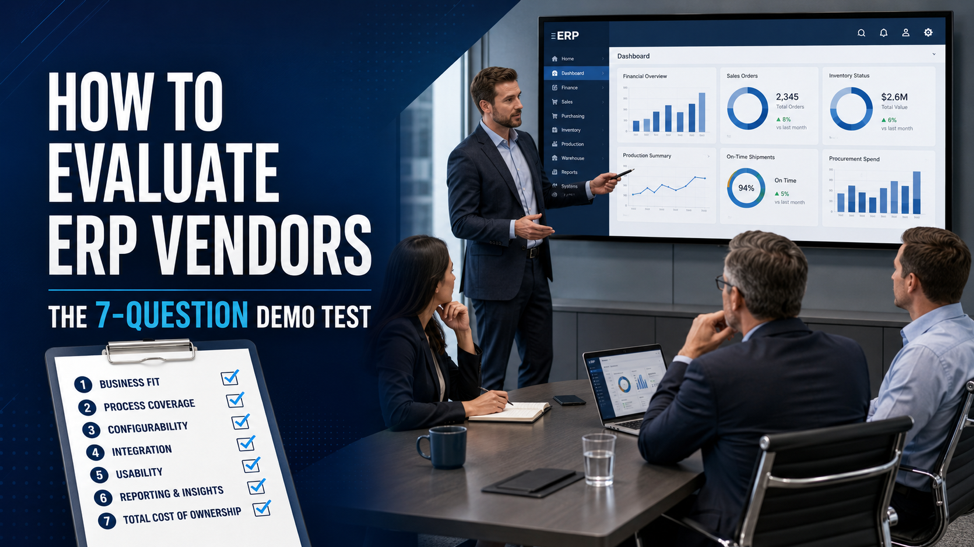
This is how you take the wheel back. Seven questions to ask during any ERP demo that cut through the polish and show you what you’re really buying. They work for any vendor, any platform, any industry.
Why the Demo Is Where Buyers Can Go Wrong
Before the questions, it helps to understand why demos are so misleading.
A sales demo is a performance. The presenter knows exactly which buttons to click, the data is pristine, and every workflow has been chosen because it looks smooth. Nothing breaks, because nothing is allowed to break. That’s not dishonest, it’s just sales, but it means a demo shows you the software at its absolute best under conditions you’ll never actually work in.
Your job as a buyer is to break the script. The moment you introduce your own data, your own edge cases, and your own hard questions, the polished performance gives way to something far more useful: the truth about how this system behaves when it meets your business. The seven questions below are designed to do exactly that.
Question 1: “Can You Run This with Our Data, Not Yours?”
Ask the vendor to demo a core workflow using a sample of your actual data, a real order, a real bill of materials, a real customer record, instead of their pre-loaded demo set.
Why it matters: clean demo data hides everything hard. The moment your real data enters the picture, you find out whether the system handles your product naming, your pricing rules, your units of measure, and your exceptions, or whether it chokes on them. A vendor who confidently works with your data is showing you a system that fits. A vendor who insists on using only their own environment is showing you something too.
What a good answer looks like: willingness to load a sample ahead of the demo, or at least walk through how your specific scenario would be handled and why.
Question 2: “Show Me the Ugliest Part of Your Software”
Every ERP has a module that’s clunkier than the rest, a screen that takes more clicks than it should, a workflow that isn’t as slick as the highlight reel. Ask to see it.
Why it matters: this question does two things at once. It tests the vendor’s honesty, an evasive answer tells you how the relationship will go when problems come up later, and it shows you the floor, not just the ceiling, of the software’s usability. You already know the good parts look good. What you need to know is how bad the not-good parts are, because your team will live in all of it, not just the demo highlights.
What a good answer looks like: a straight answer. A vendor who can candidly say “reporting takes some setup” or “this screen is dated but here’s the workaround” is far more trustworthy than one who claims everything is perfect.
Question 3: “What Happens When This Doesn’t Work?”
Pick a moment mid-demo and ask: when this breaks in production, who do I call, how fast do they respond, and what does that cost?
Why it matters: support is the part of the ERP relationship you’ll rely on most and see least during the sales process. It’s also the number one source of buyer’s remorse in the ERP world, the sinking feeling of being stuck between a vendor and an implementation partner who each point at the other while your problem sits unresolved. (This is common enough that we wrote a whole guide on why partnering with an experienced Acumatica reseller is crucial to getting support right.)
Ask specifically: Is support included or extra? What are the guaranteed response times? Do you get a dedicated contact, or a ticket queue? Who provides the support, the software maker or a separate partner, and what happens when they disagree about whose problem it is?
What a good answer looks like: clear service-level commitments in writing, a named point of contact, and a straight explanation of who owns a problem from start to finish.
Question 4: “What Does This Cost When We’re Twice Our Size?”
Ask the vendor to price out not just where you are today, but where you’ll be in three to five years, more users, more transactions, more locations, whatever growth looks like for you.
Why it matters: ERP pricing is rarely as simple as the number on the first quote. Some systems charge per user, some by resource consumption, some by module, and the model that looks cheapest today can become the most expensive as you grow. Buyers who only evaluate today’s price get ambushed later. You want to understand the total cost of ownership over the life of the system like Acumatica, including the costs that only show up as you scale.
What a good answer looks like: a transparent walk-through of how pricing changes with growth, and a willingness to name the things that drive the bill up, rather than a single number with the details buried.
Question 5: “Show Me a Report I Actually Need”
Don’t accept the vendor’s showcase dashboard. Name a specific report your business depends on, inventory accuracy, job costing, margin by customer, on-time delivery, and ask them to build or show it live.
Why it matters: reporting is where a lot of ERP buyers get disappointed after go-live. The demo dashboards look beautiful, but they were built to look beautiful. What you need to know is whether your numbers, the ones your leadership actually makes decisions on, are easy to get out of the system, or whether they require a specialist, a custom build, or a third-party add-on you’ll pay extra for. Asking for a real report surfaces this before you buy, not after.
What a good answer looks like: the ability to produce or clearly explain your specific report, and honesty about what’s native versus what needs configuration or an add-on.
Question 6: “Who Does This Well, and Who Doesn’t It Fit?”
Ask the vendor to describe the businesses their system serves best, and, just as importantly, the ones it’s not a good fit for.
Why it matters: no ERP is right for everyone, and a trustworthy vendor knows it. A vendor who says their software is perfect for every business is selling, not advising. One who can tell you “We’re a strong fit for distributors with complex inventory, but we’re probably overkill for a simple services business” is showing you they understand fit and gives you a real signal about whether you are in their sweet spot. The best vendors will honestly tell you when you’re not.
What a good answer looks like: a clear, specific description of their ideal customer and their non-fit, backed by references you can call.
Question 7: “Walk Me Through What the First 90 Days Really Looks Like”
End the demo by shifting from the software to the implementation. Ask the vendor to describe, concretely, what happens after you sign, the discovery process, the timeline, who’s involved on both sides, and where projects like yours typically get stuck.
Why it matters: the software is only half of what you’re buying. The other half is the implementation, and that’s where most ERP disappointments actually originate, not in the product, but in rushed discovery, thin data preparation, and unclear expectations. A vendor who can walk you through a realistic implementation, including the hard parts and the risks, is one who’s done it many times and takes it seriously. A vendor who waves this away with “it’s easy, we’ll have you live in no time” is raising a red flag. If you want to know what those red flags look like, we covered the top reasons ERP implementations fail and how to avoid them.
What a good answer looks like: a specific, phased implementation approach, honest talk about what your team will need to contribute, and a realistic timeline, not the fastest possible one.
Putting the Answers Together
Seven questions, one underlying purpose: to move the demo out of the vendor’s script and into your reality. Any single answer tells you something. Taken together, they tell you the two things that matter most, whether the software genuinely fits your business, and whether the people behind it will be honest and reliable partners for the years ahead.
The demo test isn’t the whole evaluation. You’ll still want to define your requirements up front, check references, compare total cost of ownership carefully, and score your options against consistent criteria. Our comprehensive guide to ERP vendor selection covers that full process, including a vendor evaluation matrix you can use to compare candidates side by side, and our checklist for prioritizing ERP requirements helps you decide what to weigh most heavily before you ever sit through a demo.
But, the demo is where it gets real. Use these seven questions, and you’ll leave every ERP demo knowing what you’re buying for the long-term, not just what the vendor wanted to show you.
Don’t rely on memory after three demos blur together. Score every vendor the same way, in the room, right after each presentation and compare your completed scorecards side by side. Includes the seven questions, a red-flag checklist, and debrief prompts.
FAQs
1. How many ERP vendors should I evaluate before deciding?
Most businesses land on a shortlist of three to five vendors for demos, narrowed from a longer initial list. Fewer than three and you lack comparison; many more than five and the demos blur together. The goal is enough options to see meaningful differences without overwhelming your evaluation team.
2. Should I use the same questions for every vendor demo?
Yes. Asking every vendor the same core questions is what makes their answers comparable. Consistency turns a series of impressive-but-fuzzy demos into a side-by-side evaluation you can score and defend to stakeholders.
3. What's the biggest mistake buyers make during ERP demos?
Letting the vendor drive. When you sit back and watch a scripted, happy-path demo on clean data, you see the software at its best under conditions you’ll never work in. The buyers who choose well are the ones who interrupt the script with their own data, their own edge cases, and their own hard questions.
4. How is a demo different from checking references?
The demo shows you how the software behaves; references show you how the vendor behaves over time. You need both. A great demo with weak references, or vice versa, is a warning sign. Use the demo to test fit and honesty in the moment, and references to verify that experience held up across a full implementation and beyond.
5. Should the software vendor and the implementation partner be evaluated separately?
Often, yes. With many ERP systems, the company that makes the software and the partner who implements and supports it are different organizations. Both matter, and both should be evaluated, because a strong product with a weak implementation partner is one of the most common ways ERP projects go wrong.
6. How long should an ERP demo be?
A thorough first demo usually runs 60 to 90 minutes, with follow-up sessions for deeper dives into specific modules. Be wary of a demo so short it can only cover highlights, or one so rushed the vendor won’t stop to answer your questions. The best demos are conversational, you’re interrupting, asking, and testing throughout, not sitting through an uninterrupted pitch.
7. Should I send vendors my requirements before the demo?
Yes. Sharing your key requirements and a few real scenarios ahead of time lets vendors tailor the demo to your business instead of running their generic script, and it lets you compare how well each one prepared. A vendor who shows up having actually built the demo around your needs is demonstrating exactly the attentiveness you want after you sign.
8. Who from my team should attend ERP demos?
Include the people who’ll actually use the system daily, not just executives and IT. The warehouse lead, the accountant, and the order-entry team will spot practical problems a leadership-only audience misses. Their buy-in also matters enormously for adoption later, so involving them in the evaluation pays off well beyond the demo itself.
9. What are red flags to watch for during an ERP demo?
The clearest warning signs are a vendor who won’t work with your real data, claims their software is perfect for everyone, dodges direct questions about support or pricing, rushes past the implementation details, or pressures you to sign quickly. Any one of these tells you more about the years ahead than the polished workflows do.
10. How do I compare demos from different vendors fairly?
Ask every vendor the same core questions and score their answers immediately after each session, while it’s fresh, using consistent criteria. Demos blur together fast, so written notes and a simple scoring sheet turn a series of impressions into a defensible, side-by-side comparison you can bring to stakeholders.
11. Can I ask for a second demo or a trial before deciding?
Absolutely, and you should. A follow-up demo focused on your toughest scenarios, or a sandbox environment your team can test hands-on, reveals far more than a single guided walkthrough. A confident vendor will welcome the request; reluctance to let you look closer is itself a signal.
12. Is a cheaper ERP with a great demo worth the risk?
Price and demo polish are both poor predictors of long-term success. The real cost of an ERP shows up over years, in support, scaling, and implementation, and a slick demo can hide a weak partner behind it. Evaluate total cost of ownership and the people who’ll support you, not just the sticker price and the highlight reel.
13. What should I do right after an ERP demo?
Debrief with your team within a day, while impressions are sharp. Capture what fit your business, what didn’t, which questions the vendor dodged, and any concerns each attendee raised. This immediate debrief is where the real evaluation happens, the demo just gives you the material for it.
- Key Takeaways
- Introduction
- Demo Where the Buyers Can Go Wrong
- Q 1: Run This with Our Data, Not Yours?
- Q 2: Show Me What You Would Like to Be Improved in the Software
- Q 3: What Happens When This Doesn't Work?
- Q 4: What Does This Cost When We're Twice Our Size?
- Q 5: Show Me a Report I Actually Need
- Q 6: Who Does This Well, and Who Doesn't It Fit?
- Q 7: Walk Me Through What the First 90 Days Really Looks Like
- Putting the Answers Together
- FAQs